Present Your Designs with the Invitation & Greeting Card Mockup
For any designer, the moment of presentation is where your work either shines or falls flat. You've poured hours into selecting the perfect premium font, crafting a harmonious color palette, and ensuring every line of text is perfectly kerned. Yet, presenting that final design as a flat, static image on a screen often fails to convey the tangible quality and emotional impact of a physical card. This is where a meticulously crafted tool like the Invitation & Greeting Card Mockup becomes indispensable. It bridges the gap between your digital file and the real-world product, offering a clean, elegant stage to showcase your creative font choices and layout decisions with stunning realism.
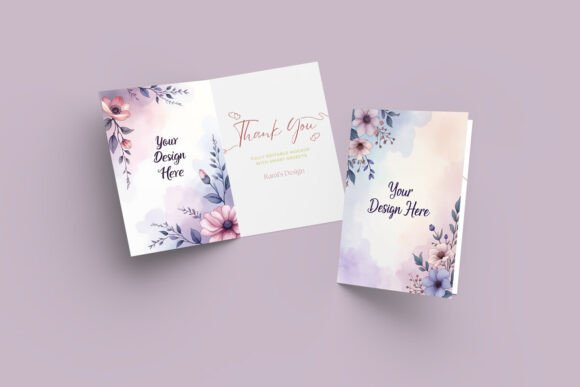
This particular mockup is more than just a static image; it's a versatile presentation system. It features both an open card, displaying the interior where your script font or handwritten font might carry a personal message, and a partially closed card that reveals the exterior design. This dual perspective is crucial. It allows you to tell a complete design story—showing how the typeface on the cover creates first impressions and how the interior layout guides the reader's eye. The visual personality is one of sophistication and clarity. The neutral, customizable background doesn't compete with your work; it elevates it, ensuring your brand identity or personal style remains the hero.
Where Your Designs Come to Life: Practical Applications
The true value of a tool like this Invitation & Greeting Card Mockup lies in its application across a wide spectrum of projects. For a logo design or branding project, you can present a complete stationery suite, showing how a client's new sans serif font for their business name translates onto a tangible thank-you card. In editorial design and publishing, it's perfect for showcasing chapter headers or special edition inserts. Imagine presenting a book's interior design by displaying a mockup of a bookmark or a companion greeting card that uses the same serif font family.
For entrepreneurs and small business owners, the applications are immediately practical. Use it to preview wedding stationery suites, holiday marketing mailers, or loyalty program cards. The ability to edit the background color and included texture options means you can match the mockup to the season or campaign aesthetic instantly. Content creators and marketers can use it to generate high-quality social media graphics or website banners that look professional and polished, far superior to a simple screenshot of a design file. The high-resolution output (3000 x 2000 px) ensures your visuals remain sharp and detailed, whether viewed on a retina display or printed for a client meeting.
Ensuring Your Typography and Layout Make an Impact
A mockup does more than just display; it influences perception. Seeing your display font or elegant serif font presented on a realistic card surface allows you to critically evaluate its performance in context. Does the font pairing between the headline and body text maintain readability at this simulated size? Does the chosen modern typography style evoke the right emotion for a baby shower invitation versus a corporate event? This tool provides the context needed for those vital assessments.
The professional presentation directly impacts brand perception. When you show a client a design presented in this mockup, it communicates that you value precision and care about the final product. It builds confidence and helps the client visualize the end result, which is often a hurdle in the design approval process. The well-organized PSD layers are a testament to this professionalism. Each element is independent, allowing you to focus on perfecting the visual hierarchy of your design without wrestling with the mockup file itself. The inclusion of a "How to Use" TXT file also speaks to a thoughtful, user-centric approach.
A Practical Guide to Using This Design Asset
Integrating this mockup into your workflow is straightforward, thanks to its use of Smart Objects. In Adobe Photoshop, you simply double-click the Smart Object layer, place your design file (be it for packaging design, a greeting card, or a web design element), save, and watch it automatically conform to the card's perspective and lighting. This process is a massive time-saver, especially when presenting multiple design variations.
When evaluating if this mockup fits your project, consider its style. The clean, elegant aesthetic is versatile but leans towards a modern, minimalist presentation. It would beautifully complement designs using clean sans serif fonts, refined serif fonts, or delicate script fonts. For more rustic, textured, or heavily themed designs, you might need to heavily customize the background or consider a different mockup style altogether. Always test your specific design within the file before finalizing a presentation to a client.
Finally, a crucial note on licensing. The files included (PSD and JPEG) are for your use in creating presentations and showcasing your work. They are NOT to be resold, shared, or offered as freebies. This is a standard and important restriction that protects the asset's value. Respecting these terms ensures you can use this powerful design asset confidently in your professional and commercial projects, from client work to your own commercial font or product line promotions.